
네트워크 전문가가 되기 위한 고속 성장 일지 by Net Wiz Team
4.1 Configure and verify inside source NAT using static and pools 본문
4.1 Configure and verify inside source NAT using static and pools
리리아나(Net Wiz) 2024. 3. 1. 17:084.1 Configure and verify inside source NAT using static and pools
NAT(Network Address Translation)
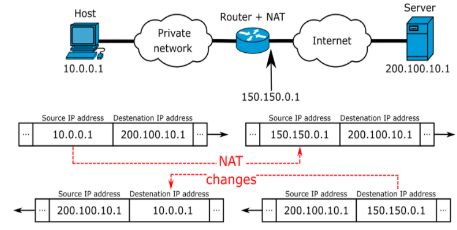
1. 사설 ip주소를 공인 ip주소로 바뀌주는데 사용하는 통신망의 주소 변환기
2. 인터넷의 공인 ip 주소를 절약 가능
- 사설 ip주소를 사용하면서 이를 공인 ip주소로 상호변환할 수 있도록 하여 공인 ip주소를 다수가 함께 사용할 수 있다.
3. 사용자들의 고유한 사설망을 침입자들로부터 보호 가능.
- 인터넷과 사설망 사이에 방화벽을 설치하여 외부 공격으로서 사용자의 통신망을 보호하는 수단으로 활용할 수 있다.
4. 주요 기능
- IP Masquerading (IP 위장, IP 마스커레이드)
▷ 외부망에서 볼 때 내부망 여러 호스트들이 단일 NAT 서버 하나로만 보임
▷ 단 하나의 공인 IP로 내부 모든 PC가 대표 IP 주소를 공유 사용
▷ IP 계층 상에서 IP 주소 변환 기능으로 마치 가면(위장)의 효과가 있음
- Port Forwarding (포트 포워딩)
▷ 내부망 여러 호스트들이 외부망과 트랜스포트계층에시 각각 별도로 연결짓게 할 수 있음.
▷ 서비스 포트 번호 별로 내부의 사설 IP로 지정된 호스트로 전달
- Load Balancing
▷ 각 포트별로 트래픽을 균형있게 함
5. NAT 유형
- 정적 NAT (Static NAT)
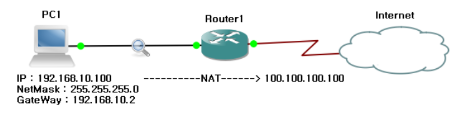
▷ 내부 호스트 / 서버가 외부로 패킷을 전송할 경우에 특정 IP주소로만 변환
▷ Router1
Router#conf t
R1(config)#ip nat inside source static <local-ip><global-ip>
R1(config)#interface <type-number>
R1(config-if)#ip nat inside // NAT 내부 인터페이스로 지정
R1(config-if)#interface <type-number>
R1(config-if)#ip nat outside // NAT 외부 인터페이스로 지정
- 동적 NAT (Dynamic NAT)
▷ 내부 다수의 호스트들이 외부로 패킷을 전송할 경우 정해놓은 범위내의 IP주소로 변환
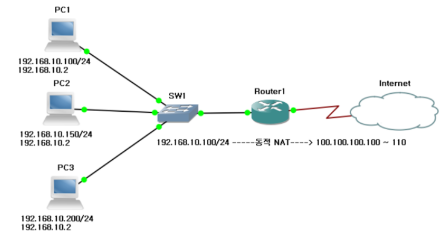
▷ Router1
R1#conf t
R1(config)#ip nat pool <name> <start ip address> <end ip address> netmask <subnet mask>
R1(config)#access-list <list-number> permit <inside local address> <wildcard mask>
R1(config)#ip nat inside source lsit <list-number> pool <name>
R1(config)#interface <type-number>
R1(config-if)#ip nat inside
R1(config-if)#interface <type-number>
R1(config-if)#ip nat outside
- PAT(Port Address Translation)
▷ 동적 NAT에서 내부 다수의 호스트들이 소수의 IP로 변환되어 외부로 패킷을 전송할 때 포트번호를 이용하여 전송
▷ Router1
R1#conf t
R1(config)#ip nat pool <name> <start ip address> <end ip address> netmask <subnet mask>
R1(config)#access-list <list-number> permit <inside local address> <wildcard mask>
R1(config)#ip nat inside source list <list-number> pool <name> overload
R1(config)#interface <type-number>
R1(config-if)#ip nat inside
R1(config-if)#interface <type-number>
R1(config-if)#ip nat outside
출처: http://www.ktword.co.kr/abbr_view.php?m_temp1=1676&m_search=nat
https://johyungen.tistory.com/98
'CCNA-Fundamental' 카테고리의 다른 글
| 4.3 Explain the role of DHCP and DNS within the network (0) | 2024.03.01 |
|---|---|
| 4.2 Configure and verify NTP operating in a client and server mode (0) | 2024.03.01 |
| 3.5 Describe the purpose of first hop redundancy protocol (0) | 2024.03.01 |
| 3.4 Configure and verify single area OSPFv2 (1) | 2024.03.01 |
| 3.3 Configure and verify IPv4 and IPv6 static routing (0) | 2024.03.01 |


